
We use a system called Arbor to manage our day to day school information.

The Arbor App is used to keep you informed about your child’s life at school and allows you to contact the school, report student absences, book school meals, pay for trips, manage your child’s information, and much more!
You can download the Arbor App from the Apple App Store or the Google Play Store. It is free to download.


Need help using Arbor?
Here are some answers to the most common questions we get asked about using Arbor:
What is my username?
Your username is your E-mail address.
I forgot my password.
If you forget your password, you can reset it from the login screen. If you provide the correct email address associated with your account, you will receive a link to reset yourpassword.
What can I use to access Arbor?
We recommend using the Arbor Parent App available from the Apple App Store or Google Play Store.
You can however also login via an Internet Browser such as Google Chrome.
How do I top up my children’s dinner account?
1. Select the Menu icon and click “Payments”.
2. Select your child’s account to see more information.
3. Click the green “Top Up My Account” button.
4. Input the amount you wish to top up and then click “Pay Now”.
5. Enter your card information to make the payment.
How do I report a student absence?
1. Once you have logged in to the Arbor Parent App, click on Quick Actions, and then Attendance.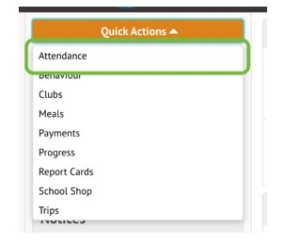
2. Then click the green Log Absence button.
3. Please provide a reason for the absence and as much detail as possible.
By default the absence will reflect the full day, however if your child will only be away for a short period of time then you can make adjustments to the times.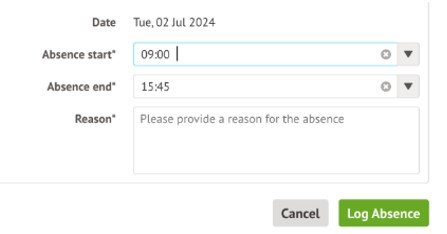
4. Once you have filled in all the information, click the Log Absence button. The absence will now be visible to the school office team.